
Glink VT Lite2.2.1 - App Store
You'll be able to see results in few seconds.
Publisher Description

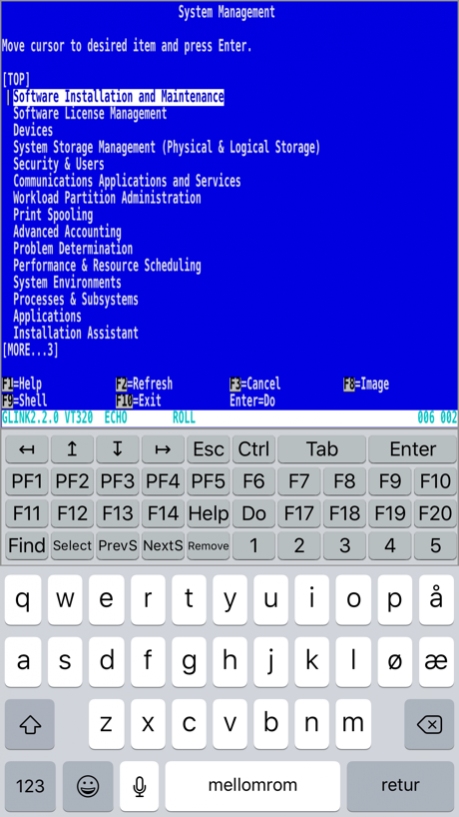

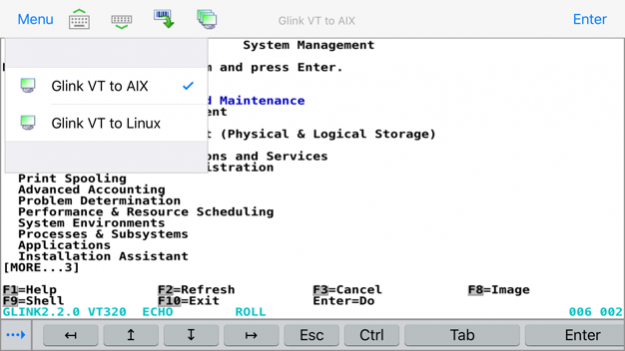

Glink VT Lite is NOT supported on iOS 15
Glink VT Lite for iPad/iPhone/iPod touch is a free iOS-version with Ads of Gallagher & Robertson's best-selling terminal emulation program, Glink Professional Edition for Microsoft Windows.
Glink VT Lite is used to access applications running on UNIX, Linux and DEC host systems. Glink VT Lite emulates DEC VT100/220/320/340/420 terminals and uses the Telnet protocol for communication with the host systems.
Glink VT Lite brings you a high quality and proven emulator on your iPad, iPhone or iPod touch devices. It allows you to try the Glink VT terminal emulation App before purchasing the full version of Glink VT with more features. See below.
FEATURES
- DEC VT420, VT320/340, VT220 and VT102 terminal emulation, all screen sizes
- Telnet communication to host
- SSL/TLS support for secure communication
- SSH for direct communication with the SSH Daemon
- SSH tunneling for Telnet protocol
- Username/password or private key for SSH authentication
- Multiline toolbar with function keys and macros
- Switch toolbar display on/off with action bar icon
- Configurable line spacing for improved readability and to make it easier to hit hotspots
- Pop-up standard keyboard with support of international characters
- Tab/shift-Tab and arrow-keys supported on external Bluetooth keyboard
- All major function keys available as keyboard shortcuts
- Press and hold Command-key on external keyboard to see list of built-in keyboard shortcuts
- Colors can be customized
- Multiple host configurations supported
- Optional password protected configurations
- Optional use of double-tap as Enter/Transmit
- Print or e-mail host print data
- Print or e-mail terminal emulation content or scroll-back buffer content
- Zoom and scroll as the Safari browser
- Blinking attribute supported
- Blinking cursor supported
- Two finger swipe gesture to move cursor
- Tap and hold to open http:// or https:// URL in internal or external browser
- Tap and hold to open Mail with e-mail address on screen
- Camera supported as barcode scanner
- Linea Pro and Infinea Tab barcode scanner/magnetic card reader supported
- Socket Mobile barcode scanners connected in iOS mode (Bluetooth Accessory Protocol)
- Other Bluetooth barcode scanners, like Opticon OPN2002, connected as external keyboard
The Ad-free version, Glink VT, includes the following additional features:
- Multiple concurrent host sessions
- Macro recording for auto-login and for assignment to toolbar
- Customize toolbars, add/remove function keys and macros
- Optional auto-connect at startup
- Configurable scroll-back buffer contains history of your host session
- Export and import of configurations
- Configurable hotspots for function keys, option numbers and URLs
Mar 24, 2017 Version 2.2.1
This app has been updated by Apple to display the Apple Watch app icon.
- Support for numeric IPv6 address format
- The SSH parameters for number of columns and rows were ignored
- Added scan icon for Linea Pro/Infinea Tab barcode readers
About Glink VT Lite
The company that develops Glink VT Lite is Gallagher & Robertson AS. The latest version released by its developer is 2.2.1.
To install Glink VT Lite on your iOS device, just click the green Continue To App button above to start the installation process. The app is listed on our website since 2017-03-24 and was downloaded 0 times. We have already checked if the download link is safe, however for your own protection we recommend that you scan the downloaded app with your antivirus. Your antivirus may detect the Glink VT Lite as malware if the download link is broken.
How to install Glink VT Lite on your iOS device:
- Click on the Continue To App button on our website. This will redirect you to the App Store.
- Once the Glink VT Lite is shown in the iTunes listing of your iOS device, you can start its download and installation. Tap on the GET button to the right of the app to start downloading it.
- If you are not logged-in the iOS appstore app, you'll be prompted for your your Apple ID and/or password.
- After Glink VT Lite is downloaded, you'll see an INSTALL button to the right. Tap on it to start the actual installation of the iOS app.
- Once installation is finished you can tap on the OPEN button to start it. Its icon will also be added to your device home screen.
Program Details
System requirements
Download information
Pricing
Version History
version 2.2.1
posted on 2017-03-24
Mar 24, 2017 Version 2.2.1
This app has been updated by Apple to use the latest Apple signing certificate.
- Support for numeric IPv6 address format
- The SSH parameters for number of columns and rows were ignored
- Added scan icon for Linea Pro/Infinea Tab barcode readers
version 2.2.1
posted on 2017-03-24
Mar 24, 2017 Version 2.2.1
- Support for numeric IPv6 address format
- The SSH parameters for number of columns and rows were ignored
- Added scan icon for Linea Pro/Infinea Tab barcode readers
version 2.2.1
posted on 2017-03-24
Mar 24, 2017 Version 2.2.1
This app has been updated by Apple to display the Apple Watch app icon.
- Support for numeric IPv6 address format
- The SSH parameters for number of columns and rows were ignored
- Added scan icon for Linea Pro/Infinea Tab barcode readers
version 2.0.0
posted on 2016-07-08
version 2.2.1
posted on 1970-01-01
2017年3月24日 Version 2.2.1
- Support for numeric IPv6 address format
- The SSH parameters for number of columns and rows were ignored
- Added scan icon for Linea Pro/Infinea Tab barcode readers
Disclaimer
Official App Store Link
We do not host Glink VT Lite on our servers. We did not scan it for viruses, adware, spyware or other type of malware. This app is hosted by Apple and passed their terms and conditions to be listed there. We recommend caution when installing it.
The App Store link for Glink VT Lite is provided to you by apps112.com without any warranties, representations or guarantees of any kind, so access it at your own risk.
If you have questions regarding this particular app contact the publisher directly. For questions about the functionalities of apps112.com contact us.
